
Introduction: Throughput Is a System, Not a Sprint
Material flow is a rate problem: cycle time multiplied by distance equals drag on your dock. On a busy cross-dock, the pallet stacker often becomes the pinch point as traffic spikes at shift change. We see 2.7 minutes per lift on average, 14% variance by aisle, and up to 9% time lost to congestion—small numbers that wreck SLA consistency at scale. So the real question is simple: are you optimizing the unit, or the system? (Hint: both matter.) If your WMS throughput lags, your lift fleet’s torque curve, battery management, and operator routing ripple through every KPI.

Break down the stack: duty cycle, turn radius, charge topology, and telemetry. Add edge computing nodes for real-time slotting. Tie torque demand to actual mast loads. Then ask: which variable gives you the most delta per dollar? That’s the lever we’ll pull next—and we’ll put it against real floor pain, not brochure metrics. Onward to the root causes.
Part 2: The Quiet Costs Behind “Good Enough” Stacking
Where does the friction really hide?
The main story isn’t speed. It’s mismatch. An electric stacker forklift can be spec-perfect on paper and still bleed minutes in the aisle. Why? Charging windows don’t align with shift breaks. CAN bus telemetry is noisy or siloed. Power converters throttle under brownout. And operators compensate with wider turns, which adds micro-delays you never see in the dashboard. Look, it’s simpler than you think: if your Li-ion BMS is tuned for long-haul shifts but you run bursty waves, your state-of-charge window is wrong—so your peak output dips right when outbound peaks.
Then there’s visibility. Most teams log fault codes, not patterns. Without edge analytics, you miss that 80% of “slow lift” tickets tie back to mast loads and cold-aisle temps. Your torque curve in winter is not the same as in summer—funny how that works, right? Add in operator fatigue, aisle widths that flirt with spec, and legacy safety cutbacks that trigger at the worst moments. The result: a “reliable” stacker that still underperforms during rush. Fix the fit, not the label.
Part 3: New Principles for Next-Gen Stacking (Comparative View)
What’s Next
Compare old-school tuning with a control stack that optimizes in real time. Legacy fleets hold fixed lift profiles, fixed regen, fixed routes. New control loops use sensor fusion, thermal maps, and micro-scheduling to rebalance lift speed, regen braking, and aisle priority on the fly. Pair that with a modern electric stacker forklift and you get a different game: the mast learns the load, the drive learns the traffic, and the charger learns the shift. Not magic—just better feedback loops. And yes, it makes maintenance easier because anomalies stand out when everything else is stable.
Principle by principle: telemetry must be actionable, not archival. Charging must be opportunistic, not fixed. Safety must be smart, not blunt. When the system sees congestion, it staggers pick sequences and trims deadheading. When it sees cold-aisle drag, it pre-warms cells to protect discharge curves. When it sees late wave spikes, it prioritizes high-SKU lanes. The headline? More pallets per hour with fewer spikes. Fewer spikes mean fewer escalations—and calmer ops teams. That’s the real win.
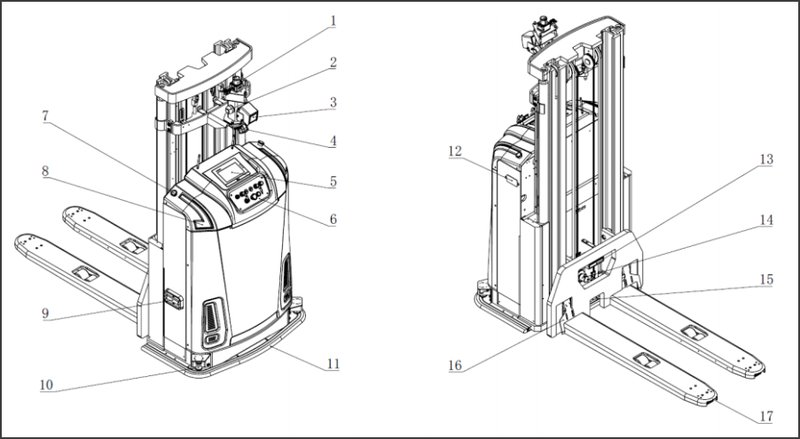
Conclusion: How to Choose—Three Metrics That Actually Matter
Cut through the noise with three checks. First, time-to-clear per wave: measure median and 95th percentile cycle times, not just average, and tie them to aisle density. Second, energy per lift under real loads: track Wh per lift across cold and hot zones, with the BMS and chargers logged to the same clock. Third, fault-to-insight latency: how fast can a code turn into a routed fix via edge analytics, not just a ticket? If a candidate stacker improves all three—without ballooning aisle rules—you’ve found your fit. Keep it boring, keep it predictable, and your floor gets fast. For deeper technical playbooks and system-level approaches, see SEER Robotics.